

Work safely

Site: StudentWeb
Course: Contributing to Health and Safety of self and others in the Workplace
Book: Work safely
Printed by: Guest user
Date: Thursday, 15 January 2026, 5:39 AM

Description

black framed eyeglasses on white textile
Photo by @miercat_photography on Unsplash, accessed 10/08/2021

1. Safety procedures and instructions

As a Victorian Public Servant (VPS) you are required to understand and follow the legal and ethical principles that relate to work, health and safety (WHS) in your workplace. 

It is important to be aware of the laws related to your WHS obligations.

shallow focus photo of high voltage signage
Photo by @esptroy on Unsplash, accessed 08/09/2021

1.1. WHS legislation

wooden gravel on table in courtroom
Photo by Sora Shimazaki from Pexels, accessed 08/09/2021

There are a number of laws underpinning safety in your workplace. 

These laws outline the responsibilities of both employers and employees to work in a safe manner. Failure to comply with workplace procedures and thus laws is a criminal offence. 

You may have heard of companies who have been fined for failing to comply with WHS laws. Individual employees can also be fined under health and safety legislation if they cause an accident or are careless and do not follow safety procedures or use equipment safely.


But the list goes on. Download the OHS legislation register and scan through the laws and regulations related to WHS:

1.2. Policies and procedures

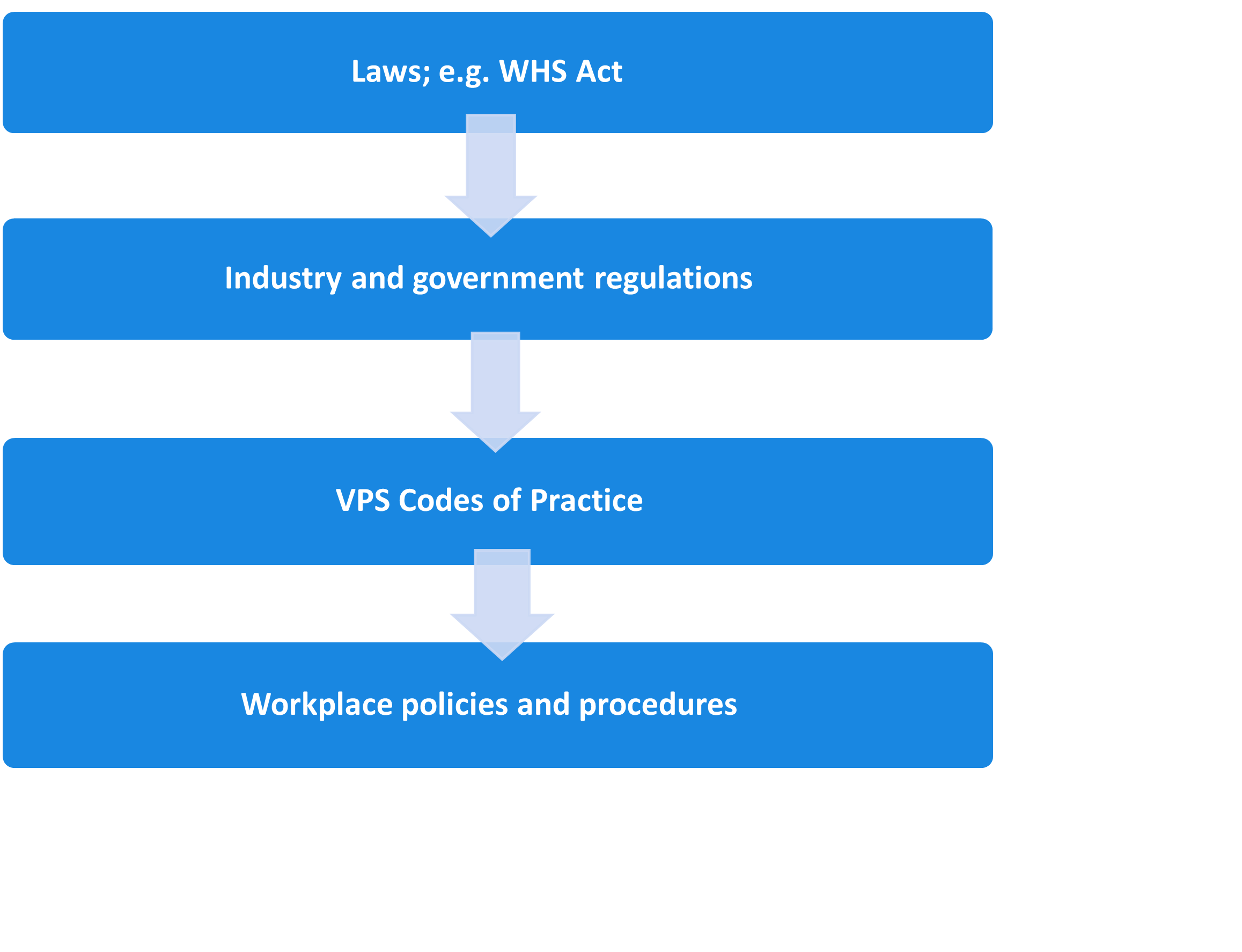
Your workplace policies and procedures are based on these WHS laws, industry regulations and legal and ethical codes of practice. So by following your organisation’s WHS policies and procedures, you should be acting in a lawful and safe manner.

Flow chart. Laws; e.g. WHS Act.
Industry and government regulations. VPS Codes of Practice. Workplace policies and procedures.


1.3. VPS WHS framework

Under the Victorian Occupational Health and Safety Act (2004), every employer is responsible to make sure the workplace, resources and culture allows for you to conduct your work in a safe and productive manner.

You may be familiar with the Victorian Public Service (VPS) governance framework called Leading the Way.

Developed in conjunction with the unions, Worksafe Victoria and government departments it outlines the VPS strategy to improve health, safety and welfare and incorporates various policies such as the:

  • Mental Health and Wellbeing charter (MHW)
  • Occupational violence and aggression (OVA)
  • Education and training framework.

Read through the poster– Strategy Overview Leading the Way to see what the VPS is doing to foster a physically and mentally safe environment for its employees.

PDF file link: Strategy Overview Leading the Way – VPSOpen this document with ReadSpeaker docReader

To learn more about these various programs, strategies and resources visit the website below.

1.4. Let’s get local

girl in black t-shirt writing on white paper
Photo by @jeswinthomas on Unsplash, accessed 08/09/2021

Each government department’s WHS policies will differ slightly depending on the industry they work in. For example, the Department of Education (DET) is committed to the following WHS activities:

  • Preventing workplace injury
  • Enhancing workplace culture
  • Consulting collaborating and communicating with employees, health and safety representatives and other groups within the department
  • Allocating adequate resources
  • Providing transparent and robust information, training and instructions and documentation
  • Driving continuous improvement.


You were most likely inducted to your organisation’s WHS policies when you first began your job. Often that is a busy time and you may not have retained all the information. Following the WHS procedures for your organisation is your responsibility, so let’s take another look at the policies and procedures that govern your workplace.

1.5. Psychological safety

Remember when you first joined the VPS and agreed to work by the values outlined in the VPS code of conduct? These values aim to promote a safe workplace for all employees. One of these values – respect – determines how you should treat and be treated by others in your workplace.

If it’s been a while since you thought about these, check out the VPS values here:

person near clear glass window pane and window blinds low-light photography
Photo by @e_sykes on Unsplash, accessed 08/09/2021

As you saw previously, the VPS has various policies and procedures to ensure employees do not obtain psychological injuries at work. You would have read that all VPS should –

‘demonstrate respect for colleagues, other public officials and members of the Victorian community by: …ensuring freedom from discrimination, harassment and bullying;’

The VPS takes a zero tolerance approach to workplace bullying and/or violence at work. This is in line with various legislation such as the Anti-discrimination Act, 2004; Racial discrimination Act 1975 etc.

It is important to be clear on what defines workplace bullying.


Learning Activity 1

To complete this activity, read and respond to Activity 1 questions in your document Learning activity worksheet.Open this document with ReadSpeaker docReader

2. Prestart systems and equipment checks

man in black wetsuit under water
Photo by @adriendlf on Unsplash, accessed 08/09/2021

If you were about to deep sea dive or use a chain saw, you would be required to conduct pre-start checks on all equipment prior to use. 

Prestart checks are designed to protect you from any faulty wires, trips or hazards, electrical or technical issues which may cause you harm. 

While hazards may be obvious in a workshop, prestart checks should also be conducted when working in your office and particularly when working from home. 

Let’s look at some pre-start checks you can do in your office.


2.1. Office pre-start checks

Ergonomics is the study of the physical interface between a worker and the way they use their tools or equipment. Physical factors affect the health and performance of the worker. Good ergonomic design allows a worker to use their equipment, be it machinery, computer, workstation etc. so as to avoid discomfort, strain or injury to the body. Here are some ergonomic ways to ensure your work is conducted safely.

MacBook Pro on table beside white iMac and Magic Mouse
Photo by @domenicoloia on Unsplash, accessed 08/09/2021

To work safely and minimise the risk of personal injury, you must set up the area where you use your computer correctly. This area is called a workstation.

A workstation will include your desk, chair, computer/monitor, keyboard, and mouse. It will also include other business devices you place on your desk such as your phone, paper, pens, lamp etc.

If your workstation is set up incorrectly, you risk musculoskeletal injury (damage to your muscles, bones, ligaments, and nerves) and eye strain. Musculoskeletal injuries can be painful and cause ongoing damage to your health and well-being.

Fortunately, setting up your workstation correctly, taking regular breaks, and performing stretching exercises will minimise this risk.


2.2. Workstation setup

The first thing to set up or check is the positioning of your chair and computer equipment.

You should have a computer desk that is approximately 700mm in height and an ergonomic office chair allowing seat height adjustment and back support adjustment.

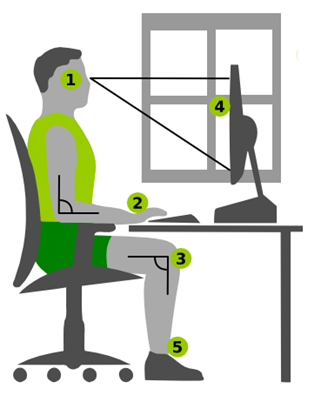
When seated at the desk, you should position the computer equipment as shown below.

Person sitting at a workstation

Marcel Kollmar, CC BY-SA 3.0 DE, via Wikimedia Commons Marcel 

1. The top of the computer monitor should be in line with your eyes when looking straight ahead.

2. The keyboard and mouse should be on the same level as your elbows and palms.

3. Your elbows and upper and lower legs should be at 90-degree angles.

4. There should be a distance of at least 50cm (approximately your arm length) from your eyes to the computer monitor screen. 

If there is a window in the room, the monitor should be positioned to the window at right angles.

5. Your feet must sit flat on a firm surface. A footstool under your feet can be used to achieve this if necessary.


To view the setup and positioning of a workstation and stretching exercises, watch this short YouTube video.

Ergonomics expert explains how to set up your desk - (03:22)

Learning Activity 2

To complete this activity, read and respond to Activity 2 questions in your document Learning activity worksheet.Open this document with ReadSpeaker docReader


2.3. Work environment

There are other environmental factors to consider in order to work safely and minimise the risk of personal injury.

Select each one for more information.

rectangular brown wooden table
Photo by @arlington_research on Unsplash, accessed 08/09/2021
There must be sufficient light to enable you to see clearly without the need to strain your eyes. 

This light may come from fluorescent tubes, tungsten or halogen lights, or natural lighting from windows.

Your computer monitor should be positioned sideways to windows to avoid eye strain and fatigue. 

Additionally, you should make sure there are no other light sources or reflective surfaces causing glare on your computer monitor.

white and gray box fan
Photo by @realbench on Unsplash, accessed 08/09/2021

The air conditioning system controls the air quality and air flow in many buildings. 

These systems should be regularly maintained and adjusted to ensure sufficient clean air is provided. 

In addition, where possible clean, fresh air should be introduced through windows.

woman wearing scarf
Photo by Pixabay from Pexels, accessed 08/09/2021

Thermal comfort relates to the temperature and humidity in the work environment. 

Although there are individual differences between people in their preferred temperature and humidity levels, a level of general comfort should be obtainable through heating or air-conditioning systems. 

Different office areas may have differences in temperature (for example, under an overhead heating duct).

2.4. Work tasks

unknown persons using computer indoors
Photo by @arlington_research on Unsplash, accessed 08/09/2021

It is important to plan your work tasks so you can vary your activities, take regular breaks and stretch. 

Sitting at a computer for extended periods takes a physical toll on your body. It is important you take regular breaks to allow the muscles you have been using, an opportunity to rest and recover.

As you saw in the video, stretching is important to allow your body to change position and your muscles to relax.

Performing these exercises frequently will help reduce tension in your back, neck, shoulders, and arms. It will also help to keep you alert and focused on your work.

persons blue eyes and brown eyes
Photo by @renaldo97 on Unsplash, accessed 08/09/2021
Eye muscles can also become tired from focusing intently on a computer monitor. To prevent tired or strained eyes, regularly change your focus away from the computer monitor.

You can do this by looking at something at a distance, for example, looking down the length of a corridor or across a large room or looking out a window at something in the distance.

Regularly changing the focus of your eyes will help to prevent eye fatigue.

To learn more, download and read through the Ergonomic workstation checklist here:

2.5. Mental health tips

man looking stressed
Photo by Nicola Barts from Pexels, accessed 08/09/2021

It is also important to consider how you can maintain your own mental health and safety while conducting your work. 

Read through the poster from the South Australian government, which promotes the Top 10 tips to maintain your mental health.


3. Emergency incidents at work

Despite the best WHS plans, unfortunately, accidents and emergencies still occur in workplaces. It is important you know how to respond if an incident happens.

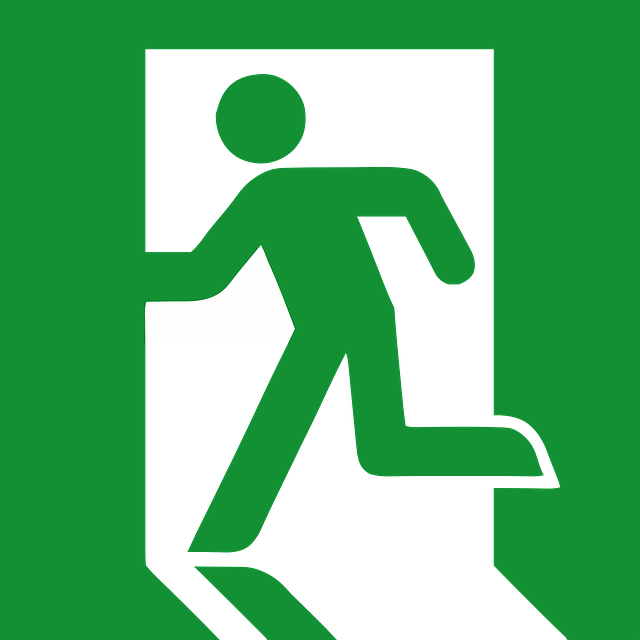
All workplaces are legally obliged to provide signage, procedures, training and practice runs such as fire drills, for all staff, to enable a swift and controlled response to any emergency incident which may occur.

Common signs, such as the ones below, will direct you to important information or equipment you may need in an emergency. Make sure you look around your workplace and locate where the emergency equipment is stored.

3.1. WHS and emergency incident policies

As an employee, you are obliged to understand and follow the policies and procedures related to WHS and emergency incidents. These procedures contain key information to help you deal with emergency situations in your workplace, such as:

  • names and contact details of the fire wardens, WHS officers and key personnel
  • the alarm system, emergency warning and intercommunication system used in the building
  • contact details for local emergency services e.g. fire brigade, police, ambulance
  • actions that employees are required to take in response to alarms
  • evacuation route/s to be taken
  • evacuation procedures including arrangements to assist any hearing, vision or mobility impaired people
  • map of assembly area or designated alternative areas which provide a safe refuge internally or externally
  • how the end of the evacuation will be signalled
  • what is required at the completion of the evacuation
  • reporting notifiable incidents.

Watch the short YouTube video here – Emergency exit and evacuation safety training video.

Emergency exit and evacuation safety training video - (01:27)


Learning Activity 3

To complete this activity, read and respond to Activity 3 questions in your document Learning activity worksheet.Open this document with ReadSpeaker docReader

3.2. Who should respond?

Emergency department of the hospital
Photo by Pixabay from Pexels, accessed 09/09/2021

Always refer to your workplace emergency procedure so you know who should respond or who to contact in an emergency. 

VPS workplaces have designated fire wardens, first aid officers, WHS representatives to contact should an emergency occur in your workplace. Make sure you know who these people are in your workplace.

However there may be a situation where you are the closest and therefore the first responder to an emergency and your quick actions will be vital. 


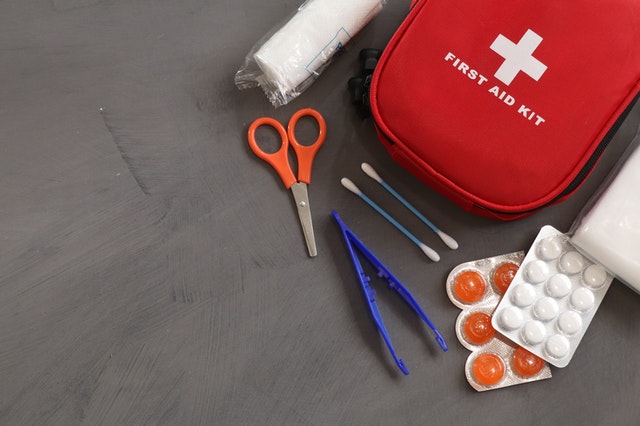
Every workplace must have a first aid kit to be available in the case of minor or sometimes major injuries. We often don’t think about them until we are in an emergency situation.

contents of a first aid kit
Photo by Roger Brown from Pexels, accessed 09/09/2021
Make sure you know:

  • where your first aid kit is located
  • what its basic contents are or should be
  • who is responsible for replenishing supplies
  • how to provide basic first aid such as stopping a bleed or dressing a cut.


When first aid training is offered, always take the opportunity to learn these skills. You never know when you will need to use them, especially if the nominated first aider is absent or on leave or you are the first responder.
  

man in white t-shirt and blue pants sitting on floor
Photo by @splitti on Unsplash, accessed 11/09/2021

3.3. External emergencies

brown and white cat on gray ground
Photo by @weanimalsmedia on Unsplash, accessed 09/09/2021

Other emergency incidents may occur outside of your workplace but will impact your response to WHS, such as:

  • natural disasters, e.g. bushfires, floods, storms
  • nearby fires, explosions, electrical outages
  • shooting or bomb threats in the city
  • pandemics  e.g. COVID 19, influenza.


In these situations it will be important to follow the advice of your WHS representative, manager or designated personnel. 


For more information on what to do during a pandemic, read – Preparing for a pandemic, created by Worksafe Victoria.

Learning Activity 4

To complete this activity, read and respond to Activity 4 questions in your document Learning activity worksheet.Open this document with ReadSpeaker docReader

This completes the first topic, in the next topic we’ll look at implementing the work health and safety procedures.