2. Prestart systems and equipment checks
2.2. Workstation setup
The first thing to set up or check is the positioning of your chair and computer equipment.
You should have a computer desk that is approximately 700mm in height and an ergonomic office chair allowing seat height adjustment and back support adjustment.
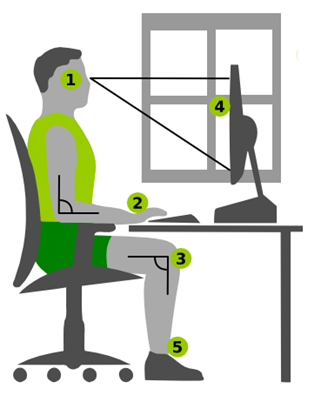
When seated at the desk, you should position the computer equipment as shown below.
1. The top of the computer monitor should be in line with your eyes when looking straight ahead.
2. The keyboard and mouse should be on the same level as your elbows and palms.
3. Your elbows and upper and lower legs should be at 90-degree angles.
4. There should be a distance of at least 50cm (approximately your arm length) from your eyes to the computer monitor screen.
If there is a window in the room, the monitor should be positioned to the window at right angles.
5. Your feet must sit flat on a firm surface. A footstool under your feet can be used to achieve this if necessary.
To view the setup and positioning of a workstation and stretching exercises, watch this short YouTube video.
Text transcript
- [Narrator] Here's your desk.
Your chair, monitor, keyboard,
mouse, phone, a plant, chair.
The problem is your desk isn't really built for you.
It's for anyone, spending eight hours a day
reaching slouching or craning can lead to pain,
at least that's what John Cinkay
from the Hospital for Special Surgery says.
- I do say that, every day.
- [Narrator] So he's here to, well, he can tell you.
- I'm here to show you how to set up your desk
ergonomically, so you can avoid pain later on in life.
Step one, adjust your chair.
The average desk height is 29 to 30 inches tall.
For some, this could be too tall or too short.
That's where your chair comes in.
The first thing you want to do is adjust the height.
When you do, make sure your elbows are bent to 90 degrees.
So if a person's feet are not touching the floor,
this could become an issue,
so we're gonna give her a footstool.
If you don't have access to a footrest,
we recommend using a ream of paper.
Step two is adjust your monitor.
The tip is to have the monitor close enough,
about arm's length so you're able to read
without having to strain your eyes
or to bend forward and adjust your posture.
So what you want to do is raise the monitor up
'til the top of the screen is eye level.
If your monitor's not adjustable in height,
use your reams of paper, much better.
If you work from two monitors, consider how you use them.
If you have a primary monitor,
you want that directly in front of you.
If you use both monitors equally,
you want them lined up so you are in the middle of the two.
For a laptop, you want to use a kickstand
to raise the screen up to the proper height.
Then, you can attach an external keyboard and mouse to it.
Step number three is to mind your mouse and your keyboard.
Where your hands end up is where your keyboard should be.
Your mouse should end up right next to your keyboard.
You want to move from your elbow
instead of your shoulder to prevent
overuse or strain or pain.
The key is not to reach for your tools.
Step four is to position your phone.
You want to put the phone on your non-writing side,
so you don't have to cradle it to your shoulder.
This could eventually lead to neck pain.
If you're on the phone a good portion of your day,
you want to consider using a headset,
that way your hands are free to write down anything,
or to type on the computer.
After 10, 15 minutes, we all begin to slouch in our chairs.
So here are some basic exercises you can do
while sitting in your chair.
The first exercise is a chin tuck.
Second exercise is for your upper traps.
You're gonna do a basic stretch
where you bend your head to one side,
and then gently pull for a little more oomph.
The third exercise is called a scapular retraction.
You basically are going to squeeze your shoulders back.
The fourth exercise is for your lower back.
This is what we call a pelvic tilt.
The most important thing you want to do
is get up out of your chair every hour.
Get up and walk, get something to eat,
get something to drink, just get up.
Learning Activity 2
To complete this activity, read and respond to Activity 2 questions in your document Learning activity worksheet.
Record your responses in your Learning activity worksheet.
Bring this document with you to your next face-to-face class to discuss with your teacher and fellow students.